
Pipefitter App1.0.0 - Google Play
You'll be able to see results in few seconds.
Publisher Description
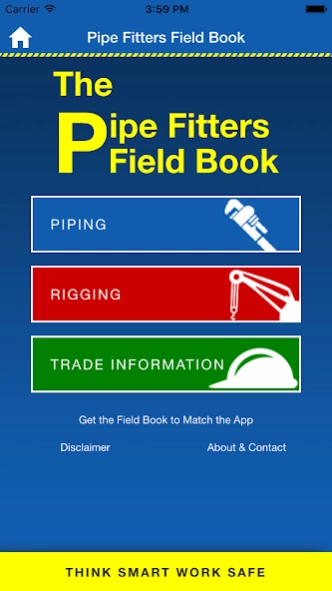
All the same trusted information that is in The Pipe Fitters Field Book
All the same trusted information that is in The Pipe Fitters Field Book is now available in an App.
THINK SMART WORK SAFE
Information contained within the App;
* Length through hub for weld neck and slip-on flanges.
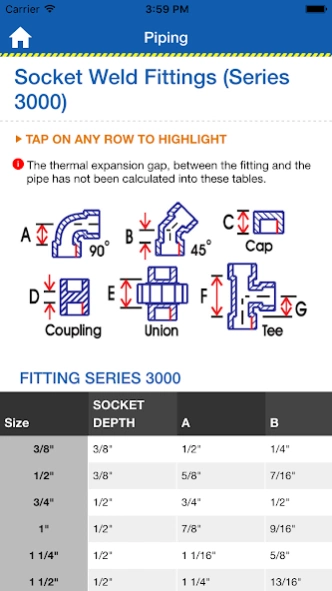
* Dimensions of butt weld fittings, socket weld fittings and flanges.
* Diameters and circumferences and nominal wall thicknesses of pipe.
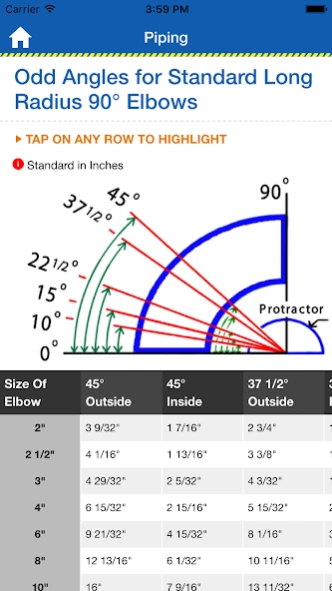
* Odd angles for long radius 90 degree elbows.
* Dissecting a circle and blind flange lay out.
* Detailed flange specifications for flange series 150-2500
* Drill and tap sizes for bolts and pipe.
* Weights for common building materials.
* Trade related formulas.
* Head pressures of water and temperature conversions.
* Layout for equal and unequal diameter branch lines at any angle.
* Shackles, inside width at the pin and the safe working load.
* Snatch block and sling leg load multiplication factors.
* The safe working load for wire rope, and nylon and wire rope slings.
* Conversion multipliers and trade related formulas.
* Explosive limits and specific gravity of different gasses.
* Pipe and water weights.
* Weights for plate steel.
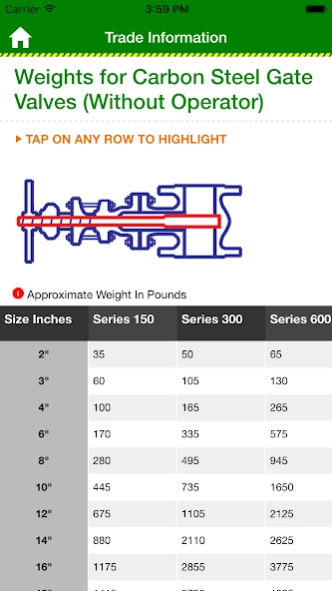
* Weights for flanged gate valves, weld fittings, blind flanges and weld neck flanges.
About Pipefitter App
The company that develops Pipefitter App is Koreteckx Inc.. The latest version released by its developer is 1.0.0.
To install Pipefitter App on your Android device, just click the green Continue To App button above to start the installation process. The app is listed on our website since 2016-02-03 and was downloaded 0 times. We have already checked if the download link is safe, however for your own protection we recommend that you scan the downloaded app with your antivirus. Your antivirus may detect the Pipefitter App as malware as malware if the download link to com.pipefitterfieldbook.pipefittersapp is broken.
How to install Pipefitter App on your Android device:
- Click on the Continue To App button on our website. This will redirect you to Google Play.
- Once the Pipefitter App is shown in the Google Play listing of your Android device, you can start its download and installation. Tap on the Install button located below the search bar and to the right of the app icon.
- A pop-up window with the permissions required by Pipefitter App will be shown. Click on Accept to continue the process.
- Pipefitter App will be downloaded onto your device, displaying a progress. Once the download completes, the installation will start and you'll get a notification after the installation is finished.
Program Details
System requirements
Download information
Pricing
Version History
version 1.0.0
posted on 2016-02-03
Disclaimer
Official Google Play Link
We do not host Pipefitter App on our servers. We did not scan it for viruses, adware, spyware or other type of malware. This app is hosted by Google and passed their terms and conditions to be listed there. We recommend caution when installing it.
The Google Play link for Pipefitter App is provided to you by apps112.com without any warranties, representations or guarantees of any kind, so access it at your own risk.
If you have questions regarding this particular app contact the publisher directly. For questions about the functionalities of apps112.com contact us.
